Sunbird APK is an Android messaging app designed to make communication between Android and iPhone users easier. The app has gained attention because of its goal of bringing iMessage-style features, including blue bubbles, reactions, read receipts, and better media sharing, to Android users.
If you are searching for Sunbird APK download, this guide explains what the app does, its main features, installation process, compatibility, and important safety points to check before installing an APK.
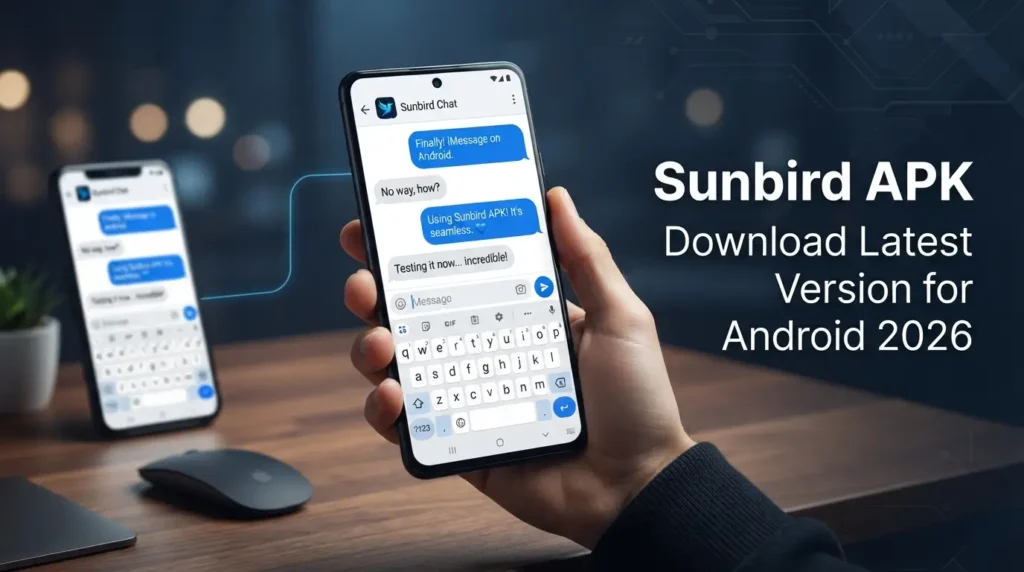
Table of Contents
Sunbird APK at a Glance
| App Detail | Information |
|---|---|
| App Name | Sunbird: iMessage for Android |
| Latest Version | v2.1.3 |
| File Size | Around 28 MB |
| Android Requirement | Android 8.0 or later |
| Price | Free |
| Platform | Android |
| Updated | September 2026 |
Important: App versions, availability, supported features, and download methods can change. Always check the current information from Sunbird’s official sources before installing an APK.
What Is Sunbird APK?
Sunbird is an Android messaging application built around cross-platform messaging. Its main appeal is the ability to give Android users an experience that is closer to Apple’s iMessage when communicating with iPhone users.
For Android users, this can be useful because normal SMS and MMS messages do not provide the same experience as modern messaging services. Sunbird aims to improve that experience with features such as message reactions, typing indicators, read receipts, and high-quality media sharing.
The important thing to understand is that Sunbird is not an official Apple iMessage app for Android. Apple does not offer an official iMessage application for Android phones. Sunbird is a third-party service that attempts to bridge this gap.
Why Are Android Users Interested in Sunbird?
The biggest reason is simple: communication between Android and iPhone users can feel limited when it falls back to traditional messaging.
Sunbird attracted attention by trying to solve some of these problems from the Android side. Depending on the current version and service availability, users may get features such as:
- Blue-bubble-style messaging
- Message reactions
- Typing indicators
- Read receipts
- Better-quality photo and video sharing
- Group messaging features
- SMS and MMS support
- A single place for different types of messages
Feature availability can vary by version, account, region, and Sunbird’s current service.
Main Features to Know
Blue-Bubble Messaging
One of Sunbird’s most talked-about features is its attempt to provide an iMessage-style conversation between Android and iPhone users.
This is particularly useful for people who regularly communicate with friends or family members using iPhones.
However, the exact appearance and behavior of messages can change as Apple, Sunbird, or other messaging systems are updated.
Reactions and Modern Messaging Tools
Traditional SMS does not offer the same range of messaging tools found in modern chat platforms. Sunbird is designed to provide a more complete messaging experience with features such as reactions, replies, typing indicators, and read receipts where supported.
These features can make everyday conversations feel more like using a modern chat app instead of basic SMS.
Better Media Sharing
Large photos and videos often lose quality when sent through traditional MMS. Sunbird focuses on improving media sharing between supported devices and services.
The actual quality can depend on the messaging method, device, network, and current Sunbird implementation.
One Messaging App
Another useful idea is having different conversations in one inbox instead of constantly switching between multiple messaging apps.
This can make messaging easier for Android users who communicate with people using different devices and services.
No Dedicated Mac Setup
Some alternative Android-to-iMessage solutions have traditionally required a Mac or another Apple device to remain connected as a server.
Sunbird’s approach is designed to reduce that requirement for users, making the setup simpler. However, users should check the current technical requirements because the service can change over time.
Sunbird APK Download and Installation Guide
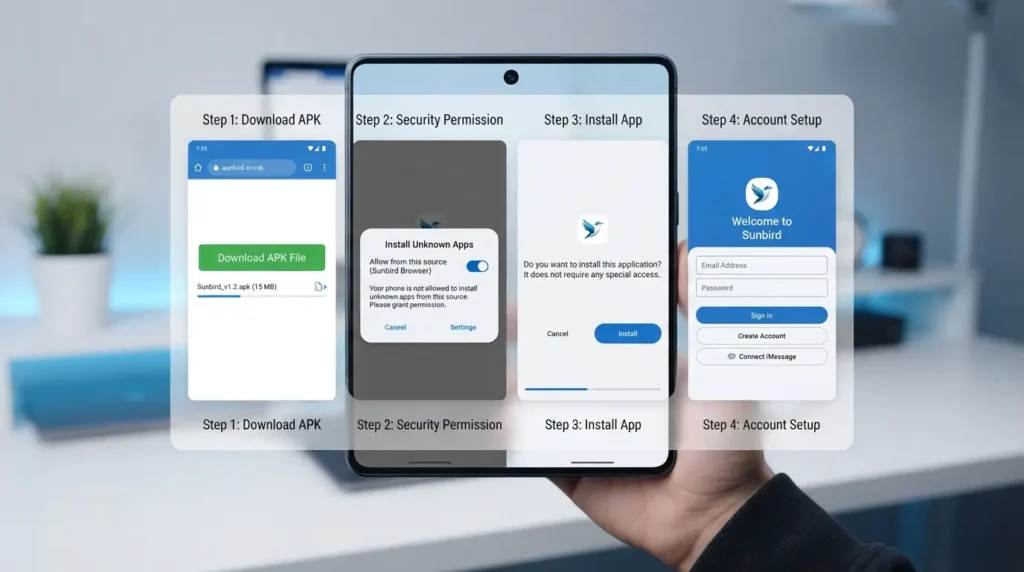
If you have obtained the APK from a source you trust, installing it on Android is usually straightforward.
Step 1: Get the APK From a Trusted Source
Download the current Sunbird APK only from a source you can verify.
Avoid random websites that offer modified APK files, “premium unlocked” versions, or files that request unusual permissions.
Step 2: Check Android Compatibility
Before installation, make sure your phone meets the Android version requirement listed for the release you are using.
Older Android devices may not support the latest version properly.
Step 3: Allow APK Installation
If Android blocks the installation, you may need to allow your browser or file manager to install applications from that source.
On newer Android versions, this permission is normally granted to a specific app rather than enabling a universal “Unknown Sources” switch.
Step 4: Install Sunbird
Open the downloaded APK and follow the Android installation instructions.
If your phone displays a security warning, stop and verify where the APK came from before continuing.
Step 5: Complete Account Setup
After installation, open Sunbird and follow the sign-up or login instructions shown in the current version.
Availability may depend on your region and whether Sunbird is accepting new users.
Is Sunbird APK Safe in 2026?
Safety is one of the most important things to check before installing any Android APK.
It is better not to describe an APK as “100% safe” simply because it works or because a website claims that it is secure. APK files can be modified, repackaged, or distributed by third parties.
Before installing Sunbird, check these points:
- Download from an official or trusted source.
- Check the APK version and publisher information.
- Avoid modified or cracked versions.
- Review the permissions requested by the app.
- Keep Google Play Protect enabled.
- Do not enter sensitive account information into unofficial copies.
- Update the application when a trusted new version is available.
- Remove the app if it behaves unexpectedly.
What About Encryption?
Sunbird has made privacy and encryption an important part of its service, but security claims should always be checked against the application’s current official documentation.
Do not assume that every APK carrying the Sunbird name has the same security protections as the official application. A modified third-party APK may behave very differently.
Can You Use iMessage on Android With Sunbird?
Sunbird’s main purpose is to provide Android users with an iMessage-like experience and bridge messaging between Android and Apple devices.
However, users should understand an important distinction: Sunbird does not turn Android into an official Apple iMessage device.
It is a third-party solution, and its compatibility depends on how its service works at the time you use it. Apple can also change its systems or security measures, which may affect third-party solutions.
For this reason, features that work today may not necessarily work in exactly the same way after future updates.
Does Sunbird Work in Pakistan?
Users in Pakistan can search for and try Sunbird on compatible Android devices, but availability should be checked at the time of installation.
Regional restrictions, account availability, beta access, and service changes can affect whether a new user can start using the application.
If the app displays a waitlist or does not allow registration, do not download random “unlocked” versions from unknown websites. A modified APK can create additional privacy and security risks.
Sunbird vs Traditional SMS
The difference becomes easier to understand when you compare the general messaging experience.
| Feature | Traditional SMS/MMS | Sunbird |
|---|---|---|
| Android messaging | Yes | Yes |
| iPhone-focused messaging experience | Limited | Designed for this use |
| Message reactions | Limited | Supported where available |
| Typing indicators | Usually no | Supported where available |
| Read receipts | Limited | Supported where available |
| High-quality media | Limited | Designed to improve the experience |
| Third-party service | No | Yes |
The exact features supported by Sunbird can change between releases.
Things to Check Before Installing the APK
Before you install any APK, take a few minutes to verify the basics.
Check the source: The download page should clearly identify the application and developer.
Check the version: Make sure you are not downloading an old release when a newer official version is available.
Check permissions: Be careful if an APK asks for access that does not make sense for a messaging application.
Check your account: Never enter your Google, Apple, or other important credentials into an unofficial modified application.
Keep a backup: If messaging is important to you, keep important conversations or information backed up through the services you normally trust.
Frequently Asked Questions
Is Sunbird an official iMessage app for Android?
No. Sunbird is a third-party Android application. Apple does not provide an official iMessage app for Android.
Is Sunbird APK free?
The version and service terms can change. Check the current official information before assuming that every feature or service is free.
Can Sunbird send messages to iPhone users?
That is the main purpose of Sunbird’s cross-platform messaging approach, but availability and supported features can change with updates.
Does Sunbird require a Mac?
Sunbird is designed to work without the traditional always-on Mac setup used by some alternative solutions. Check the current requirements for the version you are installing.
What Android version does Sunbird support?
The version information provided for the current release lists Android 8.0 or later. Always check the release requirements before installation because they can change.
Is it safe to download a modified Sunbird APK?
It is not recommended to treat modified APKs as equivalent to the official application. A modified file can contain unwanted changes, malware, or hidden permissions.
Explore More Android Apps on APKPromex
Looking for more Android apps and game APKs? Visit APKPromex to discover the latest APK downloads, new Android games, app guides, installation tips, and useful updates in one place.
You can also explore our other APK guides to find new apps and games that may work on your Android device.
Final Thoughts on Sunbird APK
Sunbird is an interesting option for Android users who want a more modern messaging experience when communicating with iPhone users. Its focus on iMessage-style communication, reactions, read receipts, typing indicators, and improved media sharing is what makes it different from ordinary SMS.
At the same time, Sunbird should be treated as a third-party service rather than an official Android version of iMessage. Availability and features can change, so users should verify the current version and download source before installing it.
If you decide to try Sunbird APK, use a trusted source, check the permissions carefully, and avoid modified or “unlocked” APK files from unknown websites.